Free on the App Store

Spelling practice that actually sticks.

SpellStar uses memory science to help children learn and retain spellings over months and years, not just until Friday's test. Aligned to the Australian Curriculum, Years 3 to 10.
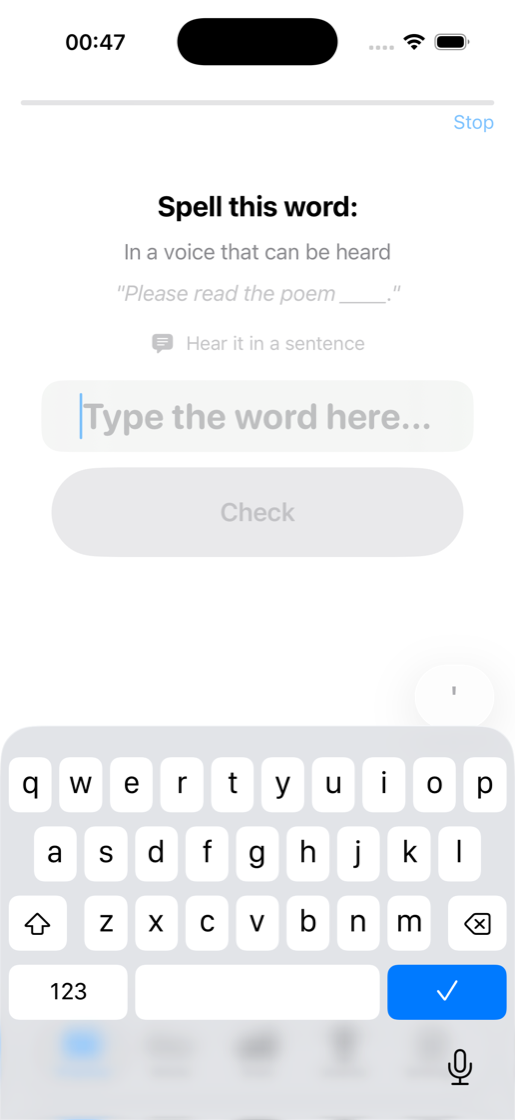
Spell this word:
To get something back that was lost
🔊 Hear word 💬 In a sentence
recov|
Check
1256 Curriculum words
8 Year levels
10 min Per session
100% Free

Everything they need to become a confident speller.

No subscriptions, no ads, no in-app purchases. Just a beautifully simple app that does one thing really well.

🎯

Adaptive placement

A quick diagnostic finds the right starting level, so your child isn't bored by easy words or overwhelmed by hard ones.

🧠

Spaced repetition

Words come back at just the right time, based on how well your child knows each one. The algorithm learns as they learn.

🇦🇺

Australian Curriculum

1256 words aligned to the Australian Curriculum v9.0, with Australian English spellings throughout: colour, practise, organisation.

🔊

Two practice modes

Independent: the app speaks the word, your child types. Parent: you read, they spell, you tap correct or incorrect.

Gentle feedback

Letter-by-letter comparison on mistakes, pattern hints for tricky features, and in-session retries. Encouraging, never punishing.

🏆

Achievements & streaks

23 achievements across six categories, plus daily streaks. Rewards effort and consistency, not perfection.

How a session works

Each session takes about 10 minutes. Short, focused, and effective.

1

Listen

The app speaks the word aloud in an Australian English voice. Your child sees the definition and can hear it used in a sentence.

2

Spell

They type the spelling. No multiple choice, no letter tiles. Real spelling, the way they'll need to do it in class.

3

Learn

Instant feedback shows what went right and what went wrong. Missed words come back later in the session for another try.

4

Remember

The algorithm schedules each word for review at the optimal moment. Over weeks, spellings move from fragile to permanent.

Aligned to the Australian Curriculum

1256 words across Years 3 to 10, mapped to the English content descriptors in version 9.0.

Year 3
142 words

High-frequency words, common letter patterns and phoneme-grapheme relationships.

Year 4
263 words

Multisyllabic words, more complex letter patterns and grammatical morphemes.

Year 5
202 words

Prefixes, suffixes and spelling generalisations including technical vocabulary.

Year 6
172 words

Word origins, spelling rules and generalisations to spell new and technical words.

Year 7
117 words

Complex morphology, academic vocabulary and subject-specific terminology.

Year 8
120 words

Etymological complexity, multi-morpheme words and discipline-specific vocabulary.

Year 9
120 words

Advanced academic and analytical vocabulary across English, Humanities and Science.

Year 10
120 words

High-level academic and formal vocabulary in preparation for senior secondary.

The science behind it

SpellStar isn't just another flashcard app. It's built on decades of memory research.

The forgetting curve

We forget new information in a predictable pattern. Without review, most of what we learn fades within days. But reviewing at just the right moment, when the memory is about to fade, makes it dramatically stronger each time.

FSRS algorithm

SpellStar uses FSRS (Free Spaced Repetition Scheduler), refined using data from hundreds of millions of reviews. It's the same algorithm behind Anki, the world's most popular flashcard system. It models how memory actually works, not just right-or-wrong scores.

Near-miss grading

Not all mistakes are equal. Spelling "acheive" instead of "achieve" is a near miss, not a complete failure. The algorithm responds proportionally to how close your child was, so one small error doesn't reset everything.

No punishment for early mistakes

A rolling window of recent attempts judges accuracy, so early mistakes when a word is brand new don't permanently drag down its score. A single bad day doesn't define a word forever.

Technical details for the curious
Algorithm FSRS v5, 21 empirically validated parameters
Target retention 90% recall probability at review time
Maximum interval 180 days between reviews
Daily caps 5 new words, 30 reviews per day
Cold start ramp 3 new words/day until 15 studied
Learning phase 2 steps (correct twice to graduate)
Near-miss threshold 1-2 letter errors = Hard; 3+ = Again
Related words Missing a word boosts related words for earlier review
Data storage Local on-device with SwiftData
Offline Everything works without internet

For educators

SpellStar works well as a daily independent literacy activity. Each session takes 10-15 minutes, making it ideal for morning routines, literacy rotations, or homework. The placement test automatically differentiates for each student. No weekly word lists to prepare, no tracking spreadsheets to maintain.

The algorithm ensures each student reviews words at individually optimised intervals based on their own performance, rather than a one-size-fits-all weekly cycle. Research consistently shows this produces significantly better long-term retention.

Frequently asked questions

Why does my child only get a few words at first?

By design. SpellStar starts with three new words per day until 15 words are in the system, then increases to five. This gentle ramp prevents your child from being overwhelmed with reviews in the first week. Within a fortnight, sessions will be fuller as review words accumulate alongside new ones.

Can I add my own words?

Yes. Use the Words tab to add custom words with definitions and example sentences. Custom words follow the same spaced repetition schedule as curriculum words.

How long until a word is mastered?

With consistent daily practice, most words reach mastery in three to six weeks. Words that are particularly tricky may take longer, and that's perfectly normal. The algorithm keeps scheduling them at appropriate intervals.

What happens if my child misses a few days?

SpellStar will welcome them back and prioritise overdue words. The algorithm accounts for the time elapsed and adjusts accordingly. Their streak will reset, but word progress is never lost.

Does it need an internet connection?

No. All words, progress data, and text-to-speech work completely offline. Data is stored locally on the device.

Is it really free?

Yes. No subscriptions, no ads, no in-app purchases. We built SpellStar for our own kids and thought other families might find it useful too.

Ready to start?

Download SpellStar and take the placement test. Your child could be practising in under a minute.

Download for iOS

Free. No account required. Works offline.